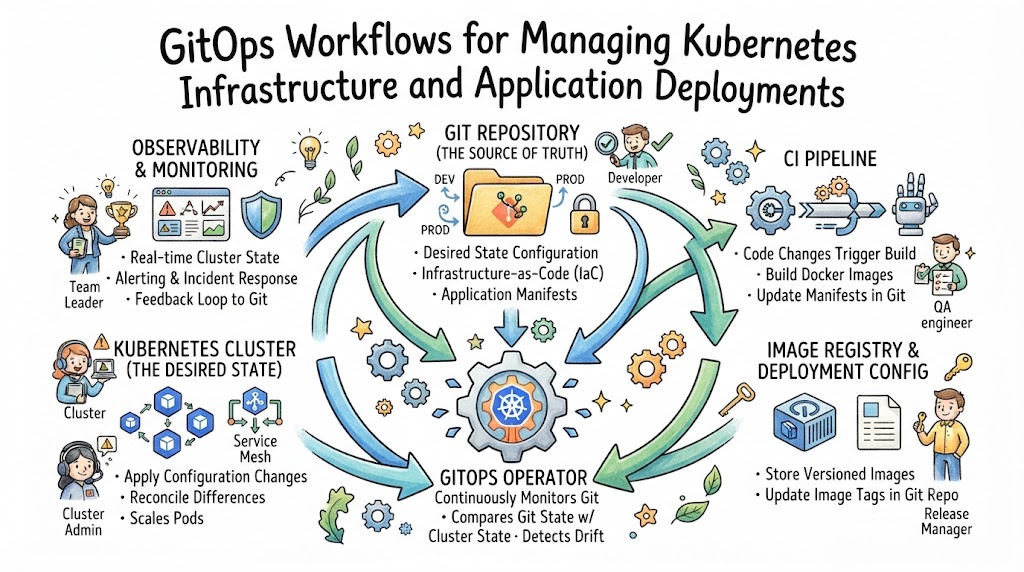
Introduction
Managing Kubernetes infrastructure becomes difficult when application teams, operations teams, and automated systems make changes in different ways. Manual commands, undocumented fixes, and inconsistent configuration files can create deployment failures and environment differences.
GitOps workflows solve this problem by making Git the controlled source of truth for infrastructure and application configuration. Instead of changing a Kubernetes cluster directly, teams propose changes through Git commits and pull requests. An automated GitOps controller then compares the approved configuration with the live cluster and applies the required updates.
This approach combines version control, automation, review processes, declarative configuration, and continuous reconciliation. It helps teams understand what changed, who approved it, when it was deployed, and whether the live environment still matches the expected state.
This article explains GitOps concepts, implementation steps, tools, projects, skills, security practices, DORA metrics, career opportunities, interview questions, and practical Kubernetes use cases.
Why GitOps Workflows Matter
For beginners
GitOps gives beginners a structured way to understand how Git, Kubernetes, automation, and Infrastructure as Code work together. Every change can be reviewed through commit history instead of being hidden inside terminal commands.
For DevOps professionals
DevOps engineers can reduce repetitive deployment work and create consistent processes across development, testing, staging, and production environments.
For SRE teams
SRE teams gain clearer deployment history, configuration visibility, drift detection, and faster recovery options. These capabilities support reliability engineering and incident analysis.
For platform engineers
Platform teams can provide reusable deployment patterns, approved templates, security policies, and self-service workflows without giving every developer unrestricted cluster access.
For engineering managers
Managers receive clearer information about deployment processes, failed changes, recovery events, approvals, and operational risks.
For software organizations
GitOps creates a common operating model for delivering applications and infrastructure. It improves traceability while reducing dependence on individual knowledge and manual procedures.
The Role of GitOps in Modern Software Delivery
Kubernetes provides powerful orchestration capabilities, but it does not automatically create a safe software delivery process. Teams still need to decide how configuration is stored, reviewed, tested, deployed, monitored, and recovered.
Traditional deployment pipelines often push changes directly into a cluster. This model can work, but the pipeline usually needs cluster credentials and broad permissions. It may also become difficult to understand whether the cluster continues to match the original deployment configuration.
GitOps commonly uses a pull-based model. A controller running inside or near the Kubernetes environment watches a Git repository. When an approved change appears, the controller pulls the desired configuration and reconciles the cluster.
This approach supports several important DevOps goals:
- Repeatable application deployments
- Consistent infrastructure configuration
- Automated drift correction
- Controlled change approval
- Auditable deployment history
- Faster rollback and recovery
- Reduced manual cluster access
- Stronger separation of responsibilities
GitOps does not replace CI, testing, monitoring, security, or incident management. It connects these capabilities through a controlled deployment process.
Important GitOps Concepts
Git as the Source of Truth
The desired state of applications and infrastructure is stored in Git. This may include Kubernetes manifests, Helm values, Kustomize overlays, policies, and infrastructure definitions.
Git should contain the approved configuration that the environment is expected to follow. Teams should avoid treating undocumented manual cluster changes as permanent configuration.
Declarative Configuration
A declarative file describes the result that should exist rather than listing every command required to create it.
For example, a Kubernetes Deployment may declare that an application should run three replicas of a specific container image. Kubernetes and the GitOps controller determine how to reach that state.
Desired State and Actual State
The desired state is stored in Git. The actual state exists inside the Kubernetes cluster.
A GitOps controller regularly compares the two states. When it detects a difference, it can report the drift or automatically correct it, depending on team policy.
Continuous Reconciliation
Reconciliation is not limited to a single deployment event. The controller continuously checks whether the cluster matches the repository.
If someone manually changes the replica count from three to one, the controller can restore it to three. This helps prevent temporary fixes from silently becoming permanent configuration.
Pull-Based Deployment
In a pull-based model, the cluster-side controller retrieves approved changes from Git. The CI system does not need to push every deployment directly into the cluster.
This can reduce the number of external systems holding sensitive Kubernetes credentials.
Immutable and Traceable Changes
Git records changes as commits. Pull requests can show the proposed modification, reviewer comments, test results, and approval history.
This makes infrastructure changes easier to audit and investigate.
Configuration Drift
Configuration drift happens when the live cluster differs from the approved configuration. It may be caused by manual changes, incomplete automation, failed deployments, or external systems.
GitOps tools can detect this difference and either alert the team or restore the declared state.
Rollback and Recovery
A rollback can be performed by reverting a Git commit or restoring a previously approved configuration.
However, teams must remember that database changes, external services, and stateful applications may require additional recovery planning. Reverting a manifest does not automatically reverse every application-side change.
Step-by-Step GitOps Workflow for Kubernetes
Step 1: Build a Strong Git Foundation
Store application code and deployment configuration in clearly managed repositories.
Teams may use a single repository, separate application and environment repositories, or a repository for each service. The structure should match team ownership and security requirements.
Tools and skills: Git, GitHub, GitLab, Bitbucket, branching, pull requests
Common mistake: Mixing experimental and production configuration without clear controls
Expected result: A traceable location for all approved deployment changes
Step 2: Define Kubernetes Resources Declaratively
Create Kubernetes manifests for Deployments, Services, ConfigMaps, Ingress resources, autoscaling, and other required objects.
Helm or Kustomize can be used to manage reusable configuration and environment differences.
Tools and skills: YAML, Kubernetes API objects, Helm, Kustomize
Common mistake: Copying complete configuration sets for every environment
Expected result: Reusable and reviewable Kubernetes definitions
Step 3: Organize Environment Configuration
Separate common application settings from environment-specific values.
For example, development may run one replica, staging two replicas, and production five replicas. Sensitive values should not be stored as plain text in Git.
Tools and skills: Kustomize overlays, Helm values, secret-management systems
Common mistake: Hard-coding passwords, tokens, or private keys
Expected result: Controlled environment differences without unnecessary duplication
Step 4: Select a GitOps Controller
Choose a controller that matches the team’s Kubernetes architecture, operational skills, security requirements, and user experience needs.
Argo CD and Flux are widely used options, but the correct choice depends on the organization.
Tools and skills: Argo CD, Flux, Kubernetes RBAC, Git authentication
Common mistake: Selecting a tool only because it is popular
Expected result: A controller capable of monitoring and reconciling approved configuration
Step 5: Connect the Repository and Cluster
Configure the GitOps controller to read the correct repository path, branch, or release reference.
Grant only the Kubernetes permissions required for the resources it must manage.
Tools and skills: SSH keys, access tokens, RBAC, namespaces
Common mistake: Giving the controller unrestricted cluster-admin permission
Expected result: Secure communication between Git and the target environment
Step 6: Add Validation Before Merge
Run automated checks whenever a pull request changes Kubernetes configuration.
Validation may include YAML checks, manifest rendering, schema validation, security scanning, policy tests, and deployment previews.
Tools and skills: CI pipelines, kubeconform, Helm linting, policy engines
Common mistake: Waiting until production reconciliation to discover invalid configuration
Expected result: Higher-quality changes entering the deployment repository
Step 7: Introduce Review and Approval Rules
Require appropriate reviews for sensitive environments.
Production changes may need approval from the service owner, platform team, security team, or another authorized reviewer.
Tools and skills: Branch protection, CODEOWNERS, pull-request templates
Common mistake: Applying the same approval process to every environment
Expected result: Risk-based governance without unnecessary delay
Step 8: Enable Reconciliation Carefully
Begin with visibility and manual synchronization where needed. Once the workflow is stable, teams can enable automated synchronization and drift correction.
Tools and skills: Sync policies, health checks, reconciliation settings
Common mistake: Enabling automatic correction before understanding existing drift
Expected result: Controlled and predictable deployment automation
Step 9: Monitor Deployment Health
Track synchronization state, application health, rollout status, controller errors, and Kubernetes events.
Application observability should also confirm whether the new version is functioning correctly.
Tools and skills: Prometheus, Grafana, OpenTelemetry, logging platforms
Common mistake: Treating successful synchronization as proof that the application works
Expected result: Visibility across configuration, deployment, and runtime behaviour
Step 10: Prepare Rollback and Incident Procedures
Document how to revert configuration, pause reconciliation, recover stateful services, and investigate failed deployments.
Test these procedures before a real incident.
Tools and skills: Git revert, deployment history, backups, incident runbooks
Common mistake: Assuming every rollback is a simple commit reversal
Expected result: Faster and safer recovery from failed changes
Relevant GitOps and Kubernetes Tools
A GitOps tool is only one part of the delivery system. Teams may also need source control, CI, configuration management, security scanning, secrets management, observability, and engineering intelligence.
The Best DevOps Tools for a particular organization depend on project size, integrations, budget, security controls, cloud platform, application architecture, and team experience.
GitOps Tool Comparison
| Tool | Main Purpose | Key Features | Best Suited For | Learning Difficulty |
|---|---|---|---|---|
| Argo CD | Kubernetes continuous delivery | Visual interface, application health, sync controls, multi-cluster support | Teams wanting strong deployment visibility | Moderate |
| Flux | Kubernetes GitOps automation | Toolkit-based design, image automation, Helm support | Teams preferring composable Kubernetes-native components | Moderate |
| Helm | Kubernetes package management | Templates, charts, values, release packaging | Reusable application deployment packages | Moderate |
| Kustomize | Configuration customization | Base configuration, overlays, patching | Teams managing environment variations | Beginner to moderate |
| Terraform | Infrastructure provisioning | Declarative cloud and infrastructure management | Creating clusters, networks, and managed services | Moderate |
| Crossplane | Cloud resources through Kubernetes | Kubernetes APIs for infrastructure composition | Platform teams building internal infrastructure APIs | Advanced |
| Kyverno | Kubernetes policy management | Validation, mutation, image verification, policy reports | Kubernetes-focused policy enforcement | Moderate |
| Open Policy Agent | General policy engine | Policy as Code using Rego | Complex and cross-platform policy requirements | Advanced |
| External Secrets Operator | Secret synchronization | Connects external secret stores with Kubernetes | Teams avoiding plain-text secrets in Git | Moderate |
| Prometheus | Metrics monitoring | Time-series metrics, alerting integration | Kubernetes and service monitoring | Moderate |
Practical Benefits of GitOps Workflows
Faster and More Consistent Delivery
Approved changes can move through a repeatable process without requiring manual deployment commands. Environment configuration follows the same operating model.
Better Collaboration
Developers, operations engineers, security teams, and service owners can review changes through familiar Git workflows.
Improved Reliability
Continuous reconciliation identifies unexpected configuration differences. Health checks and controlled rollbacks reduce the impact of some deployment failures.
Reduced Manual Work
Teams spend less time repeating cluster changes and more time improving reusable automation.
Better Visibility
Git history, pull requests, synchronization status, monitoring data, and incident records create a clearer view of the delivery lifecycle.
Stronger Security
A pull-based model can reduce the need to distribute cluster credentials across CI systems. Policy checks and approval rules can also prevent unsafe changes.
Faster Incident Investigation
Teams can compare incidents with recent commits, deployments, rollbacks, and configuration changes.
Improved Engineering Decisions
Deployment and reliability data can reveal recurring failure patterns and areas where testing, automation, or platform design should improve.
Common GitOps Challenges and Solutions
| Challenge | Practical Solution |
|---|---|
| Too many tools | Start with Git, Kubernetes, one controller, validation, and basic monitoring |
| Poor repository structure | Define ownership, naming, environment boundaries, and review rules |
| Manual cluster changes | Limit direct access and create an emergency-change procedure |
| Secret exposure | Use external secret stores, encryption, and strict access controls |
| Weak testing | Validate rendered manifests, policies, schemas, and image references before merge |
| Slow reconciliation | Review controller capacity, repository size, webhook configuration, and API limits |
| Automatic drift correction risks | Begin with alerts and manual synchronization before enabling self-healing |
| Unclear ownership | Assign owners for applications, environments, platform components, and policies |
| Missing runtime visibility | Connect deployment status with metrics, logs, traces, and alerts |
| Metric misuse | Review delivery metrics at service or team level and combine them with context |
GitOps Best Practices
Keep Git Changes Small
Small changes are easier to review, test, understand, and revert. Avoid combining unrelated infrastructure and application modifications in one pull request.
Separate CI from CD Responsibilities
CI should build, test, scan, and publish an immutable artifact. GitOps-based CD should deploy the approved artifact reference from Git.
Use Immutable Image References
Use unique image tags or image digests. Avoid deploying a changing tag such as latest, because the same configuration may produce different application versions.
Protect Production Branches
Require reviews, successful checks, and authorized ownership before changes are merged into production configuration.
Validate the Rendered Output
A Helm chart may appear correct while producing an invalid manifest. Test the final rendered resources rather than checking only templates.
Apply Least Privilege
Limit repository access, controller permissions, secret access, and cluster permissions according to actual responsibilities.
Use Policy as Code
Policies can prevent privileged containers, unapproved image registries, missing resource limits, or unsafe networking configuration.
Monitor Both Sync and Runtime Health
A synchronized application can still have high error rates or broken dependencies. Combine GitOps status with application observability.
Document Emergency Changes
Production emergencies may require rapid intervention. Record the change, restore Git as the source of truth, and review the event after recovery.
Test Recovery Regularly
Practice Git reverts, application rollback, data restoration, controller recovery, and cluster rebuilding.
Practical GitOps Example
Consider an online payment service running on Kubernetes.
A developer creates a new application version. The CI pipeline runs unit tests, security checks, and container scanning. It then publishes an image using the immutable tag payment-api:2.4.1.
The pipeline does not deploy directly to production. Instead, it opens a pull request in the environment repository that changes the image reference from 2.4.0 to 2.4.1.
The pull request triggers:
- Manifest rendering
- Kubernetes schema validation
- Policy checks
- Security controls
- Reviewer approval
After the change is merged, the GitOps controller detects it and updates the cluster. Kubernetes performs a rolling deployment.
Argo CD or Flux reports the synchronization state, while Prometheus and application monitoring track error rates, latency, availability, and resource usage.
If the error rate rises beyond the accepted limit, the team can revert the commit and investigate the failed release. The incident timeline can connect the deployment, alert, rollback, and recovery event.
Real-World GitOps Use Cases
Startups
A startup can use one GitOps controller and a simple repository structure to create repeatable deployments without building a large platform team.
Medium-Sized Technology Companies
Different product teams can manage their own application configuration while a central platform team controls templates, policies, and shared infrastructure.
Large Enterprises
Enterprises can use multiple repositories, environment boundaries, approval controls, policy enforcement, and multi-cluster management.
Cloud-Native Teams
Cloud-native teams can connect Kubernetes, Helm, service meshes, observability, autoscaling, and cloud-managed services through declarative workflows.
SRE Teams
SRE teams can use deployment history, drift detection, health status, error budgets, and recovery events to investigate reliability problems.
Platform Engineering Teams
Platform engineers can create approved application templates and self-service deployment paths while maintaining security and operational standards.
Regulated Organizations
Git history, approvals, access controls, immutable artifacts, and policy reports can support audit requirements. GitOps alone does not guarantee compliance, but it can provide useful evidence.
GitOps Learning Roadmap
| Stage | Concepts and Practical Exercise | Expected Outcome |
|---|---|---|
| DevOps fundamentals | Learn collaboration, automation, CI/CD, feedback, and shared ownership | Understand the purpose of modern delivery practices |
| Linux and networking | Practice processes, files, DNS, ports, HTTP, TLS, and troubleshooting | Diagnose basic application and network problems |
| Git and source control | Create branches, commits, pull requests, reviews, and reverts | Manage configuration changes safely |
| Scripting | Write basic Bash or Python validation scripts | Automate repetitive tasks |
| CI/CD | Build a pipeline that tests and publishes a container image | Understand artifact creation and delivery flow |
| Containers | Build, run, inspect, and secure Docker images | Package applications consistently |
| Kubernetes | Deploy an application with Services, ConfigMaps, health checks, and scaling | Operate basic containerized workloads |
| Cloud platforms | Create a managed Kubernetes cluster and supporting network | Understand cloud infrastructure dependencies |
| Infrastructure as Code | Provision a cluster using Terraform | Recreate infrastructure declaratively |
| GitOps | Install Argo CD or Flux and deploy from Git | Implement continuous reconciliation |
| Observability | Add metrics, logs, alerts, and deployment annotations | Connect deployments with runtime behaviour |
| DevSecOps | Add scanning, secrets management, RBAC, and policy checks | Build security into the workflow |
| SRE and platform engineering | Define SLOs, error budgets, templates, and self-service paths | Connect delivery speed with reliability |
| Engineering intelligence | Review DORA metrics, incidents, rollbacks, and recovery trends | Use evidence to improve the delivery system |
A strong DevOps Roadmap should combine theory with regular hands-on work. Reading alone is not enough to build operational confidence.
DevOps Skills Required for GitOps
Technical skills
- Linux administration
- Networking and DNS
- Git and pull-request workflows
- Bash, Python, or another scripting language
- CI/CD pipeline design
- Docker and container security
- Kubernetes resources and troubleshooting
- Helm and Kustomize
- Cloud infrastructure
- Terraform or another Infrastructure as Code tool
- Monitoring, logging, and tracing
- Secrets management
- RBAC and policy enforcement
- Incident response
Non-technical skills
- Clear technical communication
- Collaborative review
- Documentation
- Risk assessment
- Structured troubleshooting
- Ownership
- Feedback handling
- Problem-solving
- Learning from incidents
These DevOps Engineer Skills are useful because GitOps connects development, infrastructure, security, reliability, and change management.
Practical DevOps Projects
Project 1: GitOps-Based Static Application Deployment
Objective: Deploy a simple web application from Git.
Tools: Git, Docker, Kubernetes, Argo CD or Flux
Tasks: Build an image, write manifests, connect the repository, and synchronize the application.
Skills developed: Git, containers, Kubernetes, reconciliation
Expected result: A working application managed through Git
Project 2: Multi-Environment Configuration
Objective: Manage development, staging, and production configuration.
Tools: Git, Kubernetes, Kustomize or Helm
Tasks: Create common resources, environment values, replica differences, and approval rules.
Skills developed: Configuration reuse and environment management
Expected result: Consistent deployments without copying complete manifest sets
Project 3: Secure GitOps Pipeline
Objective: Add security validation before deployment.
Tools: CI platform, image scanner, Kyverno or OPA, external secret store
Tasks: Scan images, validate manifests, enforce policies, and remove plain-text secrets.
Skills developed: DevSecOps, policy management, secrets handling
Expected result: A controlled deployment workflow with automated security checks
Project 4: Observable Deployment System
Objective: Connect deployments with application health.
Tools: Argo CD or Flux, Prometheus, Grafana, OpenTelemetry
Tasks: Track synchronization, rollout status, latency, errors, and deployment events.
Skills developed: Observability and release analysis
Expected result: A dashboard connecting configuration changes with runtime impact
Project 5: Multi-Cluster Platform Workflow
Objective: Manage applications across multiple Kubernetes clusters.
Tools: GitOps controller, Helm, policy engine, cloud Kubernetes
Tasks: Define cluster groups, environment policies, access controls, and recovery procedures.
Skills developed: Platform engineering, governance, reliability
Expected result: A scalable and controlled multi-cluster delivery model
These projects can strengthen a portfolio of practical DevOps Projects.
Certifications and Courses
A structured course can help beginners who need an organized path through Git, Linux, containers, Kubernetes, CI/CD, cloud infrastructure, and GitOps.
Certification may be useful for professionals who want to validate foundational knowledge or prepare for roles involving Kubernetes and cloud operations. However, a certificate should support practical experience rather than replace it.
A useful Best DevOps Course should include:
- Guided hands-on labs
- Real Git repositories
- Kubernetes troubleshooting
- CI and GitOps integration
- Security checks
- Monitoring exercises
- Failed deployment scenarios
- Rollback and incident practice
When comparing the Best DevOps Certifications, examine the syllabus, lab quality, instructor experience, platform coverage, assessment method, and relevance to the intended role.
Do not rely only on certificates. Employers may also evaluate problem-solving, project experience, communication, architecture understanding, and troubleshooting ability.
Career Opportunities
| Role | Main Responsibilities | Important Skills |
|---|---|---|
| DevOps Engineer | Build delivery automation and manage infrastructure workflows | CI/CD, cloud, Kubernetes, IaC, scripting |
| Site Reliability Engineer | Improve reliability, observability, incident response, and service health | SLOs, monitoring, automation, troubleshooting |
| Platform Engineer | Build reusable internal platforms and developer workflows | Kubernetes, APIs, templates, security, product thinking |
| Cloud Engineer | Manage cloud infrastructure, networks, identity, and services | Cloud platforms, Terraform, networking |
| DevSecOps Engineer | Integrate security into development and deployment | Scanning, policies, secrets, identity, compliance |
| Automation Engineer | Automate operational and delivery processes | Scripting, APIs, pipelines, testing |
| Infrastructure Engineer | Design and maintain compute, network, storage, and cluster systems | Linux, networking, IaC, cloud |
| Build and Release Engineer | Control builds, artifacts, releases, and deployment coordination | CI/CD, versioning, repositories |
| Observability Engineer | Create monitoring, logging, tracing, and alerting systems | Metrics, logs, traces, SLOs |
| Engineering Productivity Engineer | Improve developer workflows, tooling, and delivery efficiency | Platform tools, analytics, automation, developer experience |
DevOps Engineer Salary Factors
A DevOps Engineer Salary varies significantly. Reliable comparisons should consider:
- Country and city
- Years of experience
- Role seniority
- Kubernetes and cloud skills
- Infrastructure as Code experience
- Security knowledge
- Certifications
- Company size
- Industry requirements
- On-call responsibility
- Architecture ownership
- Communication and leadership ability
Salary figures can change quickly and may not include bonuses, benefits, remote-work differences, or contract arrangements. Candidates should compare current local data for similar roles and responsibilities.
GitOps and Kubernetes Interview Questions
1. What is GitOps?
GitOps is an operating model in which approved declarative configuration is stored in Git and automated controllers reconcile systems with that configuration.
2. How is GitOps different from Infrastructure as Code?
Infrastructure as Code defines infrastructure declaratively. GitOps adds Git-based review, automated reconciliation, drift detection, and an operating process around declarative configuration.
3. Why is Git considered the source of truth?
Git contains the approved desired state, change history, reviewers, and rollback references used to manage the environment.
4. What is reconciliation?
Reconciliation is the repeated comparison of desired configuration with actual cluster state, followed by actions that reduce the difference.
5. What is configuration drift?
Drift is the difference between the approved configuration and the live environment.
6. How does a pull-based deployment improve security?
The cluster-side controller pulls approved configuration, reducing the need for external CI systems to hold broad cluster credentials.
7. What should CI do in a GitOps workflow?
CI should test code, scan dependencies, build an immutable artifact, publish it, validate configuration, and propose the updated artifact reference.
8. Why should teams avoid the latest container tag?
The tag can point to different images over time, making deployments difficult to reproduce, audit, and roll back.
9. How would you manage three Kubernetes environments?
Use reusable base configuration with controlled environment overlays or values, separate access rules, and appropriate promotion and approval processes.
10. How should secrets be handled in GitOps?
Use an external secret manager or an approved encryption process. Plain-text credentials should not be committed to Git.
11. What happens when a manual cluster change conflicts with Git?
The controller may report the difference or automatically restore the declared state, depending on synchronization policy.
12. How would you troubleshoot an application that is synchronized but unavailable?
Check Pods, readiness probes, Services, Ingress, network policies, logs, application metrics, dependencies, DNS, and recent configuration changes.
13. How can policies be enforced before deployment?
Run policy checks in CI and use an admission controller to validate resources entering the cluster.
14. What is the difference between synchronization health and application health?
Synchronization shows whether cluster configuration matches Git. Application health shows whether the workload is running and serving users correctly.
15. How would you perform a GitOps rollback?
Revert the responsible commit or restore a known configuration, then monitor reconciliation and runtime health. Stateful changes may require separate recovery.
16. How can GitOps support multiple clusters?
Repositories can define cluster-specific or grouped configuration, while controllers apply approved state to authorized target clusters.
17. What could cause slow GitOps reconciliation?
Large repositories, API throttling, controller resource limits, network problems, authentication failures, or excessive dependency processing can cause delays.
18. How does GitOps affect deployment frequency?
Reliable automation may allow teams to deploy smaller changes more often, but deployment frequency should reflect business and technical needs.
19. How can GitOps influence change-failure rate?
Review, validation, consistent configuration, and smaller releases may reduce failures. Teams still need testing, observability, and safe rollout strategies.
20. Why should DORA metrics not be used to rank individual engineers?
Software delivery is a team and system outcome. Individual ranking encourages unhealthy behaviour and ignores service complexity, dependencies, and operational context.
DORA Metrics and Engineering Intelligence
Deployment Frequency
Deployment frequency measures how often a team successfully releases changes to a target environment.
It can help teams understand batch size and delivery capability. A higher number is not automatically better if releases are unstable or unnecessary.
Lead Time for Changes
Lead time measures how long it takes a change to move from development into production.
Long lead times may indicate slow reviews, unstable tests, manual approvals, overloaded environments, or large change sizes.
Change-Failure Rate
Change-failure rate measures the percentage of deployments that cause incidents, rollbacks, hotfixes, or significant service problems.
Teams should define a failure consistently and examine patterns instead of blaming individuals.
Time to Restore Service
Time to restore service measures how quickly a team recovers after a service disruption.
Git reverts and automated reconciliation may support recovery, but complete restoration may also require application, database, dependency, or infrastructure work.
Additional Engineering Signals
MTTR: Shows recovery performance, but the precise meaning should be defined because it may refer to repair, recovery, resolution, or response.
Incident trends: Reveal recurring failure types, affected services, severity patterns, and operational weaknesses.
SLO compliance: Shows whether a service is meeting agreed reliability objectives.
Error budgets: Represent the acceptable level of unreliability within an SLO period.
Rollback frequency: Can reveal release instability, although a rollback may also demonstrate a healthy recovery process.
Service health: Combines reliability, incidents, deployment outcomes, and operational signals.
Engineering productivity: Should be evaluated through system outcomes, developer experience, flow, quality, and context—not lines of code or individual activity counts.
Metrics should guide learning and improvement. They should not become punishment targets for individual employees.
DORA Metrics Tools Comparison
| Tool Type | Data Collected | Main Insight | Suitable Team |
|---|---|---|---|
| Source-control analytics | Commits, pull requests, approvals, merge times | Change flow and review delays | Development teams |
| CI/CD analytics | Builds, tests, deployments, failures | Pipeline performance and deployment frequency | DevOps teams |
| GitOps controllers | Sync events, health, drift, revisions | Configuration and deployment state | Kubernetes teams |
| Incident platforms | Alerts, incidents, responders, resolution events | Incident trends and recovery performance | SRE and operations teams |
| Observability platforms | Metrics, logs, traces, service signals | Runtime health and failure impact | Cloud-native teams |
| SLO platforms | SLI data, SLO compliance, error budgets | Reliability against service objectives | SRE teams |
| Engineering intelligence platforms | Development, deployment, incident, and reliability data | Connected delivery and service performance | Engineering leaders |
| DevOpsIQ | Tool activity, deployments, incidents, recovery, SLO and service signals | DORA metrics, timelines, risks, and service-health context | Cross-functional engineering organizations |
BestDevOps Learning Support
BestDevOps can support learners and working professionals through structured resources covering:
- DevOps tutorials
- Tool comparisons
- Learning roadmaps
- Certification information
- Course guidance
- Interview preparation
- Hands-on project ideas
- Salary and career information
- Kubernetes, GitOps, SRE, cloud, and platform engineering practices
A DevOps Tutorial for Beginners can introduce individual tools, but learners should gradually connect those tools through complete delivery projects.
BestDevOps resources can also help professionals compare learning paths instead of selecting technologies without understanding their practical role.
DevOpsIQ Use Cases
DevOpsIQ extends technical learning by helping teams examine software delivery and reliability through connected engineering data.
It can bring together information from systems such as GitHub, GitLab, Jenkins, Jira, Prometheus, and Datadog. This can help teams connect code changes, deployments, incidents, rollbacks, and recovery events.
Practical uses include:
- Tracking deployment frequency
- Reviewing lead time for changes
- Monitoring change-failure rate
- Measuring recovery performance
- Examining incident trends
- Monitoring SLO compliance
- Tracking error-budget consumption
- Comparing service reliability
- Identifying repeated rollback patterns
- Supporting engineering planning
The Pulse Score provides a transparent summary of service health. It can help leaders notice services that may require investigation, but a single score cannot explain every technical or organizational problem.
Engineering timelines connect deployments, incidents, failures, rollbacks, and recovery events. Teams can use this sequence to understand what changed, what happened afterward, and how recovery progressed.
DevOpsIQ information should be combined with technical investigation, service complexity, user impact, and team feedback.
Future Trends in GitOps
Platform Engineering
More organizations are building internal platforms that provide approved deployment paths, reusable templates, and self-service infrastructure.
Internal Developer Platforms
Developers may interact with service catalogues and simple interfaces while GitOps operates behind the platform.
AI-Assisted Operations
AI may help summarize deployment failures, identify related events, and suggest investigation paths. Human review will remain important for high-impact actions.
Automated Incident Response
Runbooks and event-driven automation may handle selected low-risk recovery actions, such as scaling, restarting, or reverting known failures.
DevSecOps and Policy as Code
Security, compliance, image verification, and configuration controls will continue moving earlier into delivery workflows.
Advanced Observability
Deployment events will be connected more closely with traces, logs, metrics, SLOs, and user-impact data.
Engineering Intelligence
Teams will increasingly combine delivery, incident, reliability, and developer-experience information to identify system-level improvements.
FinOps Integration
Infrastructure changes may be reviewed for cost impact alongside security and reliability requirements.
Reliability Automation
Progressive delivery, automated verification, and policy-controlled recovery can reduce risk when used with clear limits and monitoring.
Frequently Asked Questions
1. Can GitOps manage both applications and infrastructure?
Yes. It can manage Kubernetes applications and some infrastructure resources. Tools such as Terraform or Crossplane may be included when cloud networks, databases, or clusters must also be provisioned.
2. Is GitOps useful for a small Kubernetes team?
Yes. A small team can begin with one repository, one cluster, basic validation, and one controller. Complex multi-cluster architecture is not required.
3. Should application code and Kubernetes configuration use one repository?
Either model can work. A single repository may be simpler for small teams, while separate repositories can improve access boundaries and environment governance.
4. Does GitOps remove the need for CI pipelines?
No. CI still performs testing, scanning, building, and artifact publishing. GitOps mainly controls the deployment and reconciliation process.
5. Can GitOps deploy applications outside Kubernetes?
GitOps ideas can be applied elsewhere, but many popular controllers are designed primarily for Kubernetes. Tool capabilities should be checked before adoption.
6. Is automatic synchronization always recommended?
No. Teams may begin with manual synchronization for sensitive environments and enable automation after validation, ownership, and recovery procedures are stable.
7. How are database migrations handled in GitOps?
Migrations require careful ordering, compatibility, backups, and rollback planning. A Kubernetes manifest rollback may not reverse a completed database migration.
8. How can teams prevent unauthorized production changes?
Use protected branches, role-based access, mandatory reviews, signed commits where appropriate, policy checks, least-privilege permissions, and audit logs.
9. Can GitOps replace Kubernetes administrators?
No. Teams still need people who understand cluster architecture, security, networking, troubleshooting, upgrades, capacity, and incident response.
10. How frequently should a GitOps controller reconcile?
The right interval depends on deployment needs, repository activity, cluster scale, API limits, and risk. Webhooks can provide faster updates without constant polling.
11. What happens when the Git repository becomes unavailable?
Existing workloads usually continue running, but new changes and reconciliation may pause. Teams need repository availability, backup, and recovery planning.
12. How should GitOps success be measured?
Review deployment reliability, lead time, drift, failed changes, recovery performance, developer experience, security findings, and service health together.
Key Takeaways
- GitOps uses Git as the controlled source of truth for declarative configuration.
- A controller continuously compares the expected and actual Kubernetes state.
- Pull-based delivery can reduce direct cluster access from external pipelines.
- CI, GitOps, observability, security, and incident response serve different purposes.
- Immutable artifacts and small changes improve traceability and recovery.
- Secrets should not be stored as unprotected plain text.
- Successful synchronization does not guarantee healthy application behaviour.
- DORA metrics should guide team and system improvement rather than individual ranking.
- Practical projects are essential for building useful GitOps skills.
- Tool choices should reflect architecture, security, scale, integrations, and team experience.
Conclusion
GitOps workflows provide a structured method for managing Kubernetes infrastructure and application deployments. By storing approved declarative configuration in Git, teams create a clear record of changes, reviews, approvals, and deployment decisions. Automated controllers then compare this desired state with the live environment and reconcile differences.
A successful GitOps implementation requires more than installing Argo CD or Flux. Teams must design repository structures, define ownership, protect sensitive branches, manage secrets securely, validate configuration, apply least-privilege permissions, monitor runtime health, and prepare recovery procedures. CI pipelines, observability systems, policy engines, and incident platforms remain important parts of the wider delivery system.
Beginners can start with a simple application and one Kubernetes cluster. Working professionals can gradually add multiple environments, automated policies, external secrets, progressive delivery, service-level objectives, and engineering intelligence. Hands-on projects help turn individual technical concepts into a complete operational workflow.
Measurement should also support continuous improvement. Deployment frequency, lead time, change-failure rate, recovery time, incidents, SLO compliance, and error budgets can reveal delivery and reliability patterns. These signals should always be reviewed with technical context and team feedback.