Introduction
Aircraft need regular inspections to stay safe and reliable. Inspectors check many parts during these inspections. They look for cracks, corrosion, dents, scratches, and other damage.
These checks often involve many images and visual details. Computer vision can help with this work. It uses cameras and software to study aircraft images.
The system can highlight areas that may need closer review. A trained inspector then checks the result. This approach combines technology with human experience.
What Is Computer Vision?
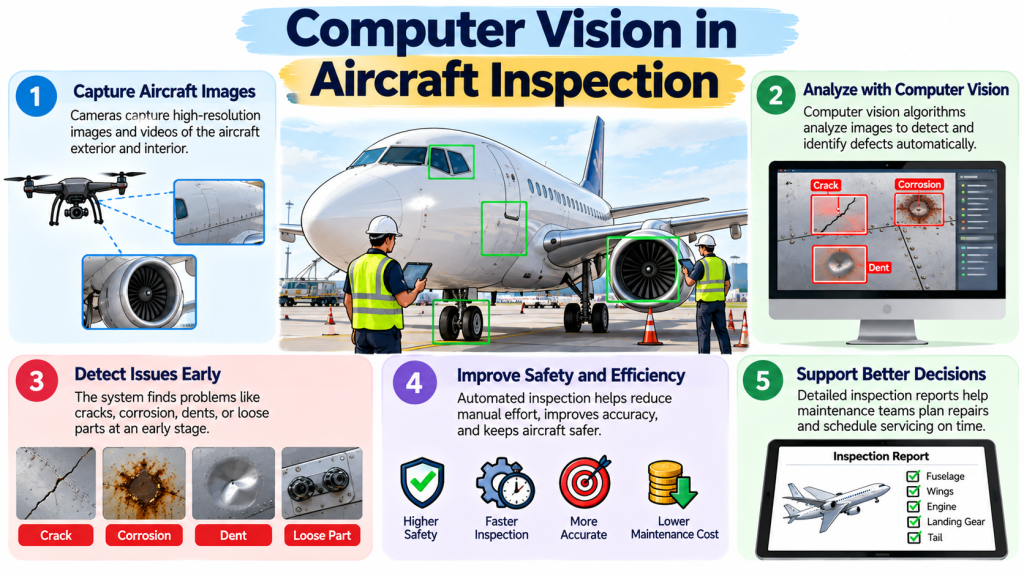
Computer vision is a technology that helps computers understand images. It uses cameras to collect visual data. Software then processes and studies that data.
For aircraft inspection, cameras can capture images of aircraft surfaces. The system can scan these images for unusual patterns.
For example, a system may find a dark area on an aircraft panel. It may also notice a scratch or possible corrosion. The system can mark that area for further review.
Computer vision does not simply take a picture. It analyzes visual information based on trained models and set rules.
Machine learning can make these systems more useful. A model can learn from many labeled images. These images can show examples of normal surfaces and visible defects.
The system then uses learned patterns to identify similar areas in new images.
How Computer Vision Works in Aircraft Inspection
Computer vision inspection usually follows several steps. Each step affects the quality of the final result.
1. Image or Video Capture
The process starts with cameras. Cameras capture images or video of the aircraft.
The camera may sit on inspection equipment, a drone, or another system. The setup depends on the inspection task.
Good image quality remains important. Poor images can make defect detection harder.
2. Image Quality Check
The system checks whether the images provide enough useful detail.
Lighting can affect this step. Shadows, glare, dirt, and reflections can also affect the images.
An inspection team may need to capture new images when the quality is poor.
3. Image Processing
Software prepares the images for analysis. It may adjust image details to make visual patterns easier to study.
The system can also divide large images into smaller areas. This can help the model focus on specific aircraft surfaces.
4. Defect Detection
The computer vision model studies the image. It looks for patterns linked to possible defects.
It may highlight a small area that needs human attention.
The system does not automatically prove that the area contains a defect.
5. Defect Classification
Some systems can also classify possible findings. For example, they may group findings as possible corrosion or surface damage.
The accuracy depends on the training data and inspection conditions.
6. Human Review
A qualified person reviews the highlighted area. The inspector checks the aircraft using approved inspection methods.
This step remains important. A computer vision system provides support, not a final maintenance decision.
7. Inspection Records
Inspection systems can store images and findings. These records can help maintenance teams track aircraft conditions.
Teams can also compare images from different inspection periods when suitable records exist.
What Can Computer Vision Detect?
Computer vision can help identify several visible aircraft conditions.
These may include:
- Surface cracks
- Corrosion
- Dents
- Scratches
- Paint damage
- Missing or damaged fasteners
- Surface wear
- Visible structural damage
- Foreign object debris
- Other unusual surface conditions
The actual detection range depends on the inspection system.
Camera quality also affects results. Lighting and viewing angles matter too.
Some defects may remain hidden below a surface. Computer vision cannot detect every hidden problem through ordinary visual images.
Other inspection methods may remain necessary for such conditions.
Where Can Computer Vision Be Used?
Computer vision can support different aircraft inspection tasks.
Aircraft Exterior Inspection
Aircraft exteriors contain large surface areas. Inspectors may need to examine many panels and sections.
Camera systems can capture detailed images of these surfaces. Software can then help identify areas that need attention.
Fuselage Inspection
The fuselage has many panels and joints. Computer vision can help review images of these areas.
The system may highlight unusual surface patterns. Inspectors can then examine those areas more closely.
Wing Inspection
Wings contain important structural parts and surfaces. Camera systems can capture images from different angles.
Computer vision can help review these images for visible damage.
Engine Exterior Inspection
Computer vision may also support visual checks around engine exteriors.
However, engine inspection involves many specific procedures. A camera-based system cannot replace required inspection methods.
Landing Gear Inspection
Landing gear contains many components that require regular checks.
Computer vision can help document visible conditions around these components. Human inspection still remains necessary.
Cabin Inspection
Computer vision can also support some cabin inspection tasks.
It may help identify visible damage, missing items, or unusual conditions. The exact use depends on the system and inspection procedure.
Drone-Assisted Inspection
Drones can capture images from areas that may require difficult access.
A drone can follow a planned inspection path. Its cameras can collect images for later review.
This approach can reduce some manual image collection work. It still requires proper planning and human oversight.
Benefits of Computer Vision in Aircraft Inspection
Computer vision can offer several practical benefits.
Faster Image Review
Inspectors may need to review a large number of images. Software can help identify areas that deserve closer attention.
This can reduce some repetitive image-review work.
Consistent Image Analysis
Human inspectors can experience fatigue during long tasks. Computer systems can review images using the same programmed approach.
This does not remove the need for human judgment. It can provide another layer of inspection support.
Better Documentation
Digital images can create a visual record of aircraft conditions.
Teams can store findings with other inspection information. This can make later review easier.
Easier Image Comparison
Some systems can help compare images taken at different times.
This can help teams notice changes in visible aircraft conditions.
Support for Early Detection
Computer vision may highlight small visual changes. Inspectors can then examine those areas in more detail.
Early identification can help maintenance teams investigate a possible issue sooner.
Less Repetitive Work
Inspectors can spend a lot of time reviewing routine images.
Computer vision can handle some initial image screening. This allows trained staff to focus more attention on areas that need review.
Limitations and Challenges
Computer vision also has important limits. Aviation professionals should understand these limits before using such systems.
Poor Lighting
Lighting can affect image quality. Shadows can hide surface details. Strong reflections can also confuse image analysis.
Good inspection conditions can improve the quality of results.
Dirty Aircraft Surfaces
Dirt, oil, dust, and other material can cover surface details.
The system may miss a defect or flag a harmless area.
Difficult Viewing Angles
Some areas are difficult to photograph clearly.
A camera may not capture the required surface from the right angle. This can limit the usefulness of computer vision.
Small or Hidden Defects
Some defects may be too small for the camera to identify.
Other problems may exist below the visible surface. Regular computer vision cannot detect every hidden condition.
False Results
Computer vision systems can produce false positives. This happens when the system flags an area that does not contain the expected defect.
Systems can also miss real defects. This creates false negatives.
Both situations require human review.
Limited Training Data
Machine learning models need suitable training data.
A model trained on limited images may struggle with new aircraft surfaces or inspection conditions.
The quality and variety of training data can affect model performance.
Different Aircraft Designs
Aircraft have different designs, materials, surfaces, and components.
A system trained for one inspection task may not work equally well for another task.
System Validation
A computer vision system needs suitable testing and validation.
Aviation organizations must use inspection technology within approved processes and requirements.
Technology alone does not decide whether an aircraft is safe to return to service.
Computer Vision and Traditional Aircraft Inspection
Computer vision works best as a support tool within an inspection process.
Traditional inspection depends heavily on trained aviation professionals. Inspectors use approved procedures and inspection methods.
Computer vision can help with image collection and image review. It can highlight areas that need closer attention.
The inspector then checks the finding using the required process.
This creates a human-and-technology workflow.
The computer can process large amounts of visual data. The inspector provides professional judgment and follows maintenance requirements.
This balance matters because visual patterns do not always explain the actual condition of an aircraft component.
Role of AI and Machine Learning
Artificial intelligence can support computer vision systems.
Machine learning models learn patterns from training data. Developers provide the model with many examples during training.
For aircraft inspection, these examples may contain images of aircraft surfaces.
Some images may show normal conditions. Others may show known defects.
The model learns visual patterns from these examples.
After training, the model can study new images. It may identify patterns that look similar to those in its training data.
However, model performance can vary.
The model may encounter an aircraft surface that differs from its training examples. It may also face unusual lighting or image quality.
This is why testing and human review remain important.
Role of Drones and Robotics
Drones and robotic systems can support image collection.
A drone can move around an aircraft and capture images from different positions. This can help teams collect visual information from difficult areas.
A planned drone route can also make image collection more repeatable.
Robotic inspection systems may follow similar paths during repeated inspections.
These technologies can reduce some manual access work. They can also create large amounts of inspection data.
However, teams still need to control the inspection process. They must ensure that the collected images meet the required quality.
A trained professional must also review important findings.
A Practical Example
Imagine an inspection team checking an aircraft wing.
A camera system captures many images of the wing surface. The computer vision software reviews these images.
The system highlights one small area. The area appears different from the surrounding surface.
The software marks it as a possible surface issue.
A qualified inspector reviews the original image. The inspector then examines the aircraft area using the required inspection procedure.
The inspector decides whether the area needs further testing or maintenance.
This example shows the proper role of computer vision.
The system helps find a possible issue. The trained professional makes the inspection decision.
Common Mistakes When Using Computer Vision for Aircraft Inspection
Treating AI Results as Final Decisions
A computer system can make mistakes. Inspectors should not treat every system alert as a confirmed defect.
Using Poor-Quality Images
Poor images can reduce detection quality. Teams should follow suitable image capture practices.
Ignoring Lighting Conditions
Bad lighting can hide important details. Teams should consider lighting before collecting inspection images.
Using Limited Training Data
A model may perform poorly when it sees conditions that differ from its training data.
Training data should cover suitable aircraft surfaces and inspection conditions.
Failing to Verify Findings
Every important finding needs proper review.
Human verification remains a key part of the inspection process.
Ignoring False Results
Both missed defects and incorrect alerts can create problems.
Teams should understand the system’s known limits and performance.
Using a System Outside Its Purpose
A computer vision tool may support one inspection task but not another.
Teams should use technology within its intended and validated scope.
Poor Record Keeping
Inspection images and findings can provide useful records.
Teams should manage these records properly as part of their inspection process.
Important Considerations Before Using Computer Vision
Several factors need attention before an organization uses computer vision.
First, the team should understand the inspection requirement. The technology must support the actual inspection task.
Next, the team should consider aircraft type and surface conditions. Different aircraft may need different inspection approaches.
Camera quality also matters. The camera must capture enough detail for the intended task.
Lighting needs careful planning as well. Poor lighting can affect image analysis.
Data quality is another key factor. Machine learning models need suitable training and testing data.
Human oversight also remains essential. Qualified personnel should review important findings.
Organizations must also consider applicable maintenance rules and approved procedures.
Data security deserves attention too. Digital inspection systems can store large amounts of aircraft information.
Finally, teams should understand system limitations before relying on the results.
Future of Computer Vision in Aircraft Inspection
Computer vision may become more capable as image-processing technology improves.
Future systems may detect smaller visible changes. They may also process larger image collections more quickly.
Drone-based inspection may become more automated. Robotic systems may also collect inspection images with greater consistency.
Inspection platforms may combine computer vision with digital maintenance records.
AI systems may also help identify changes across multiple inspection periods.
These developments could support condition monitoring and maintenance planning.
However, future systems will still need proper testing and oversight.
Aviation safety depends on approved procedures, reliable equipment, trained professionals, and careful decision-making.
Computer vision can support these processes. It should not be treated as a complete replacement for aviation inspection expertise.
FAQs
1. What is computer vision in aircraft inspection?
Computer vision uses cameras and software to analyze aircraft images. It can help identify visible areas that need closer inspection.
2. How does computer vision detect aircraft defects?
The system studies images and looks for visual patterns linked to known conditions. It can highlight possible defects for human review.
3. Can computer vision replace aircraft inspectors?
No. Computer vision can support inspection work. Qualified professionals still need to review findings and follow required inspection procedures.
4. What aircraft defects can computer vision detect?
It may help detect visible cracks, corrosion, dents, scratches, paint damage, and other surface abnormalities.
5. Can drones use computer vision for aircraft inspection?
Yes. Drones can capture aircraft images from different positions. Computer vision can then analyze those images.
6. What are the benefits of AI-based aircraft inspection?
It can help review images faster and support consistent visual analysis. It can also improve image records and highlight areas for review.
7. What are the limitations of computer vision?
Poor lighting, dirty surfaces, difficult angles, limited training data, and hidden defects can affect results.
8. How does machine learning support aircraft inspection?
Machine learning can learn visual patterns from training images. It can then use those patterns when reviewing new inspection images.
9. Is computer vision used for all aircraft inspections?
No. Different inspections require different methods. Computer vision mainly supports suitable visual inspection tasks.
10. What skills do aviation students need to understand AI-based inspection?
Students should understand basic aircraft maintenance, inspection methods, computer vision, AI concepts, image analysis, and the importance of human oversight.
Conclusion
Computer vision is becoming an important technology in aviation inspection.
It can help teams collect and review large amounts of visual information. It can also highlight areas that may need closer attention.
However, computer vision has clear limits. Poor images, unusual conditions, hidden defects, and model errors can affect results.
Trained aviation professionals remain essential. They review findings and follow approved inspection procedures.
For aviation students, learning about computer vision can build a better understanding of modern inspection technology. Platforms such as AIAVIATIONACADEMY.COM can also provide useful educational context as learners explore the growing role of AI in aviation.
The future of aircraft inspection may combine cameras, AI, drones, digital records, and human expertise. The goal remains the same: support careful and reliable aircraft maintenance.